How to Run OpenClaw Without KYC Using Bitcoin and Lightning

This article was translated from Japanese with AI. Read the original (日本語) · Report a translation issue
This article walks through one way to set up OpenClaw, the AI agent everyone is talking about right now, using technologies like Lightning and Cashu so that you expose as little personal information as possible (an approach close to the No KYC philosophy).
Now that KYC (identity verification) has become the norm, No KYC is a valuable option not just for protecting your privacy but also for censorship resistance and for spreading the risks that come with AI agents. By the end of this article, you'll know how to set up OpenClaw with anonymity in mind.
Many people assume you need a Mac mini to get OpenClaw running, but the method in this article requires no dedicated hardware. For the most part, the computer you already have is enough.
Two caveats before we begin.
1. AI is evolving at a dizzying pace, so this information will inevitably go out of date. I've tried to write it in a way that stays relevant as long as possible, but please keep in mind that it reflects the situation as of late February 2026.
2. I cannot accept any responsibility for anything that results from following this setup, including leaked private keys. Proceed at your own risk.
First, let's introduce OpenClaw and explain why No KYC matters.
What is OpenClaw? A personal AI agent
Put simply, OpenClaw is a personal AI agent that actually carries out tasks when you give it instructions over chat (WhatsApp, Telegram, Discord, Signal, Slack and so on). Existing AI tools just answer you in a chat, whereas OpenClaw goes further and executes things: sending emails, managing your calendar, checking websites and automating all kinds of tasks.
As for its rough history, it started as "warelay," an app that sent and received WhatsApp messages and replied automatically, with nothing to do with personal AI agents.
It then added features while being renamed Clawdbot and then Moltbot, before finally settling on the name OpenClaw.
OpenClaw has passed 244k stars on GitHub, and I think there are three reasons it's attracting so much attention:
- It's a product that shifts the experience from AI you ask questions to AI that takes action, and it arrived in a form ordinary users can get their hands on
- It's highly flexible and can run either in the cloud or self-hosted
- On the flip side of that convenience, because it can modify your environment and handle your credentials, it readily sparks debate about security risks
This is a bit off topic, but if you just want to try OpenClaw quickly right now, there's a service called "Clawi.ai" that's worth checking out.
What No KYC means and why it matters
Let me briefly explain No KYC, which features in this article's title. No KYC means a design or practice that doesn't perform KYC (Know Your Customer, i.e. identity verification); in other words, it doesn't require you to go through an identity verification process. However, No KYC doesn't mean no information is collected at all. Depending on the service, account identifiers, activity logs, technical information and payment information may still be gathered.
In this article, "No KYC" refers to privacy-leaning setups where you almost never log in with an email address, where you either authenticate with a public key or don't need an account at all, and where you pay with Bitcoin.
Ultimately, the motivation for running OpenClaw with No KYC comes down to protecting your privacy and self-sovereignty (protecting your own information yourself).
Imagine your OpenClaw security settings were inadequate and a data leak occurred. If you were using services that require KYC, information that can identify you, such as your name, address, face photo, subscription details, email address, social media accounts and crypto-related information, could all be exposed at once. This is not just an invasion of privacy; it leads directly to the risk of that information being used for crimes such as impersonation, extortion and fraud.
レンチ攻撃の傾向と対策 | 物理的な脅威からビットコインを守るには?
誘拐や強盗など、物理的暴力によってビットコインを奪おうとするレンチ攻撃について、データに基づいて発生状況別の対策と、レンチ攻撃耐性のあるビットコインの保管方法を提案します。
 加藤 規新

It's also worth noting that when services from major companies use KYC, signing up tends to mean you can be identified, and your usage history and behavioral data can be collected in a way that is tied to you personally.
That's exactly why setting up OpenClaw with No KYC makes sense. The idea at the heart of No KYC is to minimize the exposure of your personal information, limit the damage if a leak occurs, and get closer to a setup where you don't have to trust anyone more than necessary (trustless).
If you want to dig deeper into self-sovereignty as it relates to privacy, take a look at the article below by Takumu Oshikawa.
自己主権型アイデンティティ(SSI)とは?ビットコイン・Web5との関係
本記事ではSelf-Sovereign Identity(自己主権型アイデンティティ, SSI)という思想とビットコインの関係について解説します。SSIは政府やBigTechに大量の個人情報を収集され管理されることに対するカウンタームーブメントとして生まれた思想、運動です。
押川 拓夢
Now let's go through how to do the setup with No KYC.
Overview of the anonymous OpenClaw × Bitcoin setup
Here's the overall flow of the setup:
- Spin up a VPS (LNVPS)
- Sign-in: Nostr
- Payment: Lightning
- Launch a VM
- Connect via SSH and launch OpenClaw
- Get an API key (Routstr)
- Payment: Lightning/Cashu
- Set up a chat app (I used Signal)
LNVPS: Spinning up a No KYC VPS
First, we'll run OpenClaw on a VPS (Virtual Private Server). A VPS is a service that uses virtualization to divide a single physical server so you can use part of it as your own small, dedicated server.
To spin up a VPS without KYC, we'll use LNVPS. LNVPS is a service that lets you create and renew a VPS by paying with Lightning.
LNVPS
Bitcoin Lightning VPS provider


Signing in with Nostr
When you open the site, you'll see a screen like the one below. Click Sign In in the top-right corner.
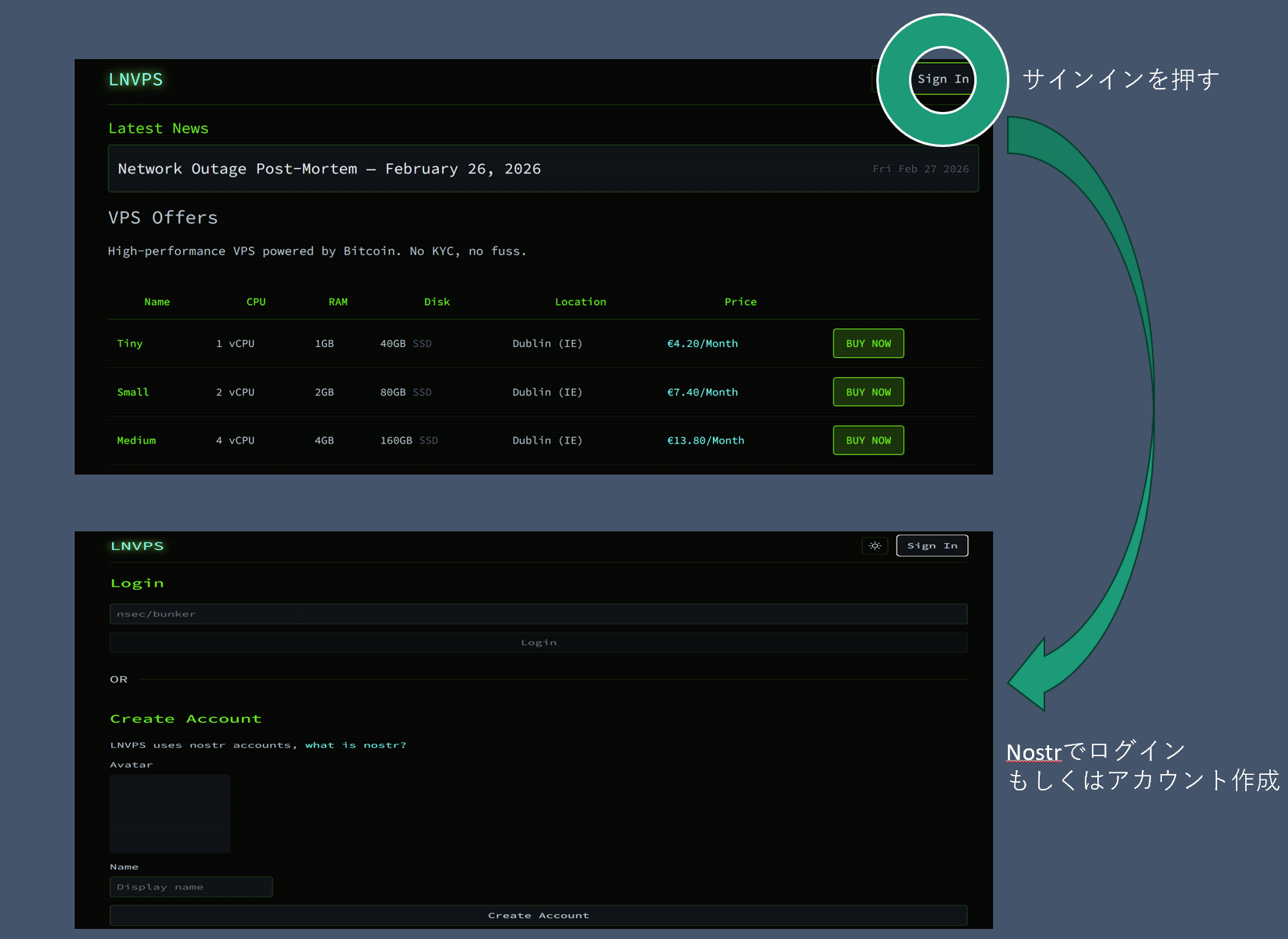
You can sign in using Nostr public key authentication.
If you're new to Nostr, it's a decentralized social network. Because you use your account through digital signatures with a public key and private key, you don't need an email address or anything like that. If you don't have an account, create one via Create Account and log in. LNVPS also supports NIP-07 (login browser extensions), so give that a try if you're interested.
After signing in, launch a VM (Virtual Machine)
Once you've signed in, choose VPS specs to suit your needs and pay with Lightning.
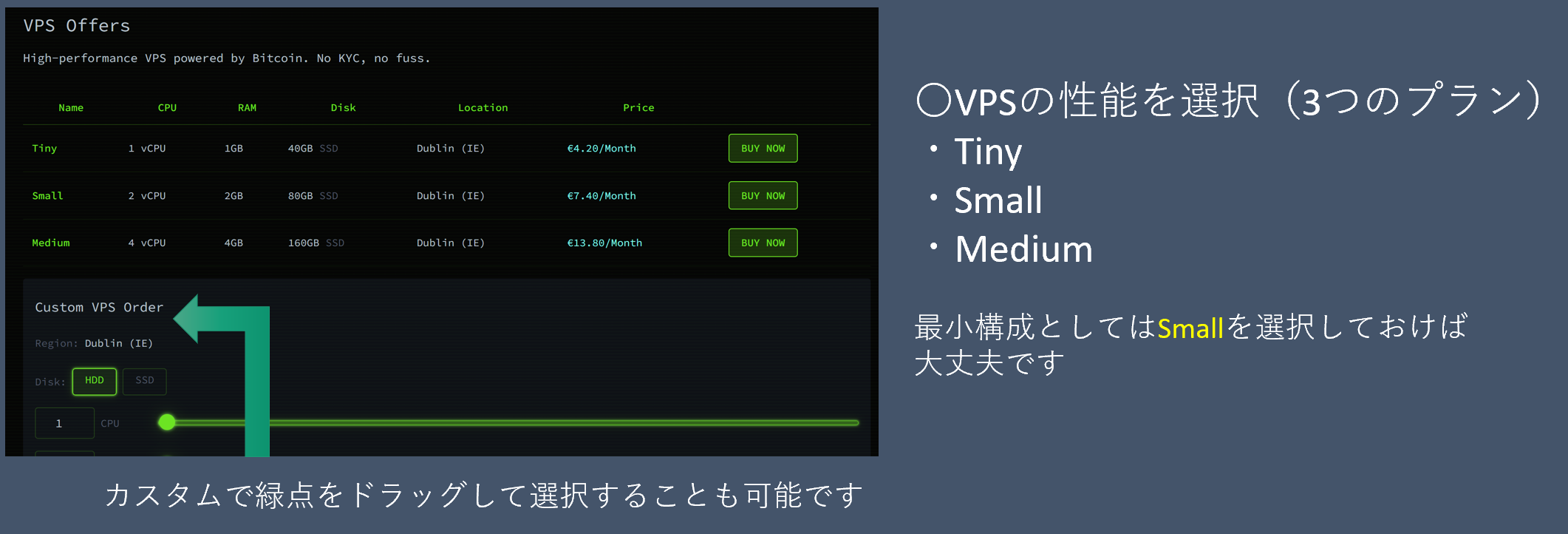
Choosing Small will be fine as the minimum spec for running OpenClaw. You can also create a custom configuration by dragging the green dots, so pick what fits your use case.
Once you've paid with Lightning, you can start the VM (Virtual Machine) from the GUI, then connect via SSH and launch OpenClaw.
💡
I don't remember this being the case when I set up my LNVPS, but apparently email verification is sometimes required when paying with Lightning. If you do need an email address, I personally recommend Proton Mail, a privacy-focused service.
If you want to take privacy even further, I also recommend SimpleLogin, a service that lets you create multiple anonymous aliases from a single email address.
Routstr: No KYC AI inference paid with Lightning or Cashu tokens
To run AI inference in OpenClaw, you normally need an API from OpenAI or Anthropic, which means registering your personal information and a credit card to get an API key. But you can also get AI inference API access without KYC, using a service called Routstr.
Routstr - Decentralized AI Inference Router
Access top AI models with Bitcoin Lightning payments. Permissionless, private, and decentralized.
 Routstr Team

Routstr is a decentralized protocol for AI inference. It aims to create an open market where people who want to sell AI inference compute (providers) and people who want to use it (clients) can trade with each other.
The role of Cashu in Routstr
You pay for Routstr with Lightning or with Cashu, a Bitcoin ecash protocol. How Cashu works is fairly complicated, so I'll skip the details here and just give you the general idea.
When paying with Lightning, you basically have to generate an invoice and pay it every time, which turns out to be surprisingly tedious. On top of that, many people would surely prefer a more privacy-conscious option than paying over Lightning if one were available.
That's where Cashu comes in. Cashu is essentially like a prepaid phone card. You prepare a token preloaded with sats in advance, and the balance is drawn down on a pay-as-you-go basis according to how much you use the LLM.
If you want to learn more about Cashu, check out this article by Kishin Kato.
Chaumian eCashを扱うエコシステムがCashuを中心に活発化
本稿でも2021年夏に紹介したFedimintはその後も着々と支持を集めており、特にフェデレーション型ではない通常のカストディによるChaumian eCashエコシステムが成長し続けています。カストディと引き換えにプライバシーとスケーラビリティを実現するFedimint及びChaumian eCashについては下記の記事をご覧ください。 Federated Chaumian Mintsで分散カストディアル・ライトニングウォレットビットコインのレイヤー2はライトニングネットワーク以外にもいくつか出てきていたり、提案されています。そのうちの1つとして、Federated Chaumian Mintsというものが少し話題になっていたので、それがどういうもので、何ができるのかを調べてみました。 https://fedimint.org CHAUMIAN MINTとは ビットコインが誕生する前にも、いわゆる仮想通貨というものは実験されていました。新しいものから遡ると、代表的なものではE-gold、Liberty Reserve、Digicash (Ecash)などが挙げられます。特に、公開鍵
加藤 規新
How to use Routstr on LNVPS
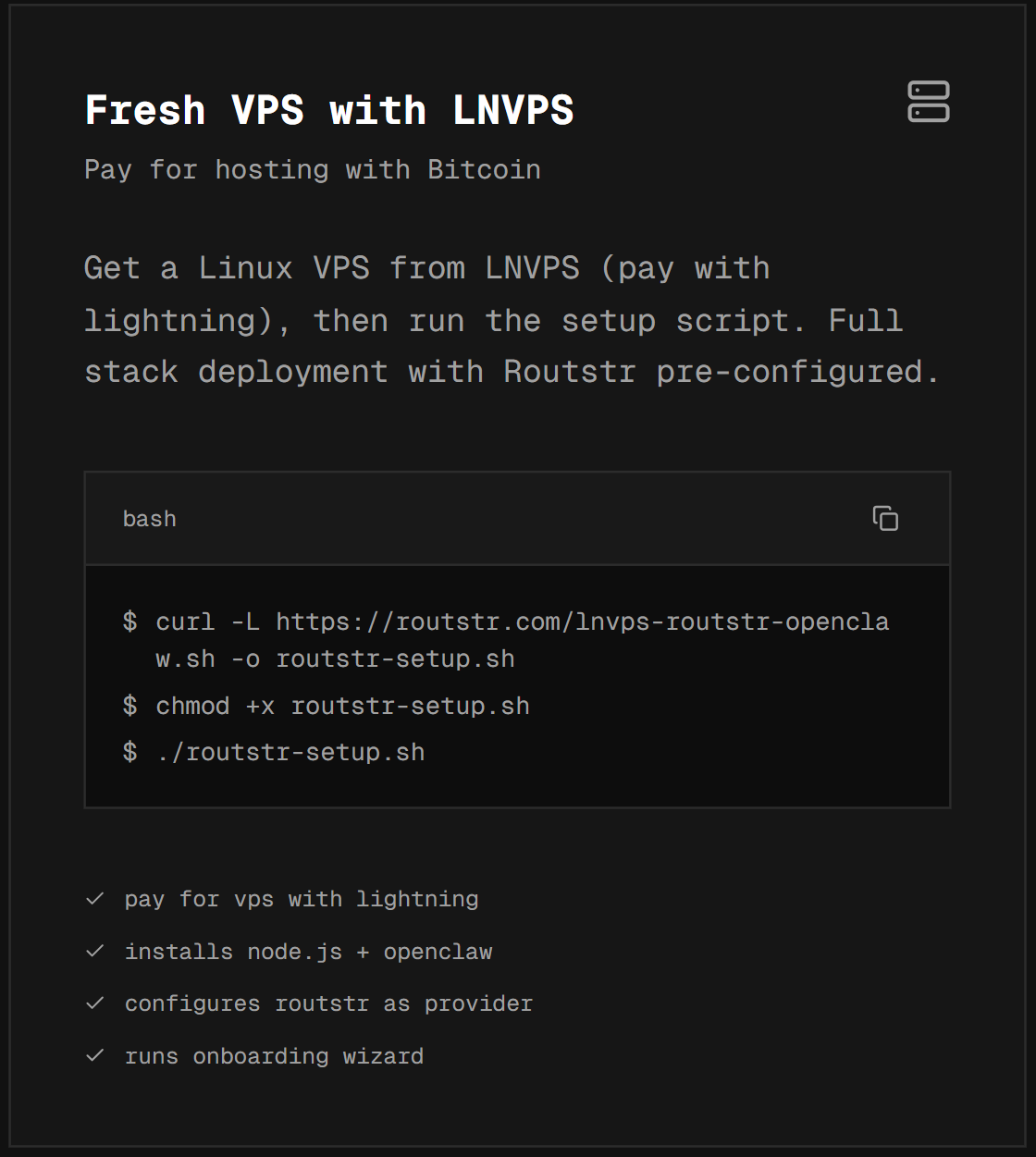
The image above is an excerpt from Routstr's official instructions for using LNVPS. To set up Routstr on LNVPS, run the following command. (Check the official docs for the latest command.)
$ curl -L <https://routstr.com/lnvps-routstr-openclaw.sh> -o routstr-setup.sh
$ chmod +x routstr-setup.sh
$ ./routstr-setup.sh
When you run the command, the setup proceeds automatically. Partway through, you choose how many sats to load, and a QR code is generated. Scan it and pay with Lightning, and a Cashu token is created automatically so you can start using AI inference.
For detailed setup instructions, refer to this site.
Integration - Routstr Core Documentation
FastAPI-based reverse proxy for OpenAI-compatible APIs with Bitcoin eCash micropayments
 Routstr Team
If you want to generate Cashu tokens yourself, I recommend Minibits, a Cashu + Lightning wallet app.
I set it up with Signal
During setup, OpenClaw asks which connection method you want to use, as shown in the screenshot below.
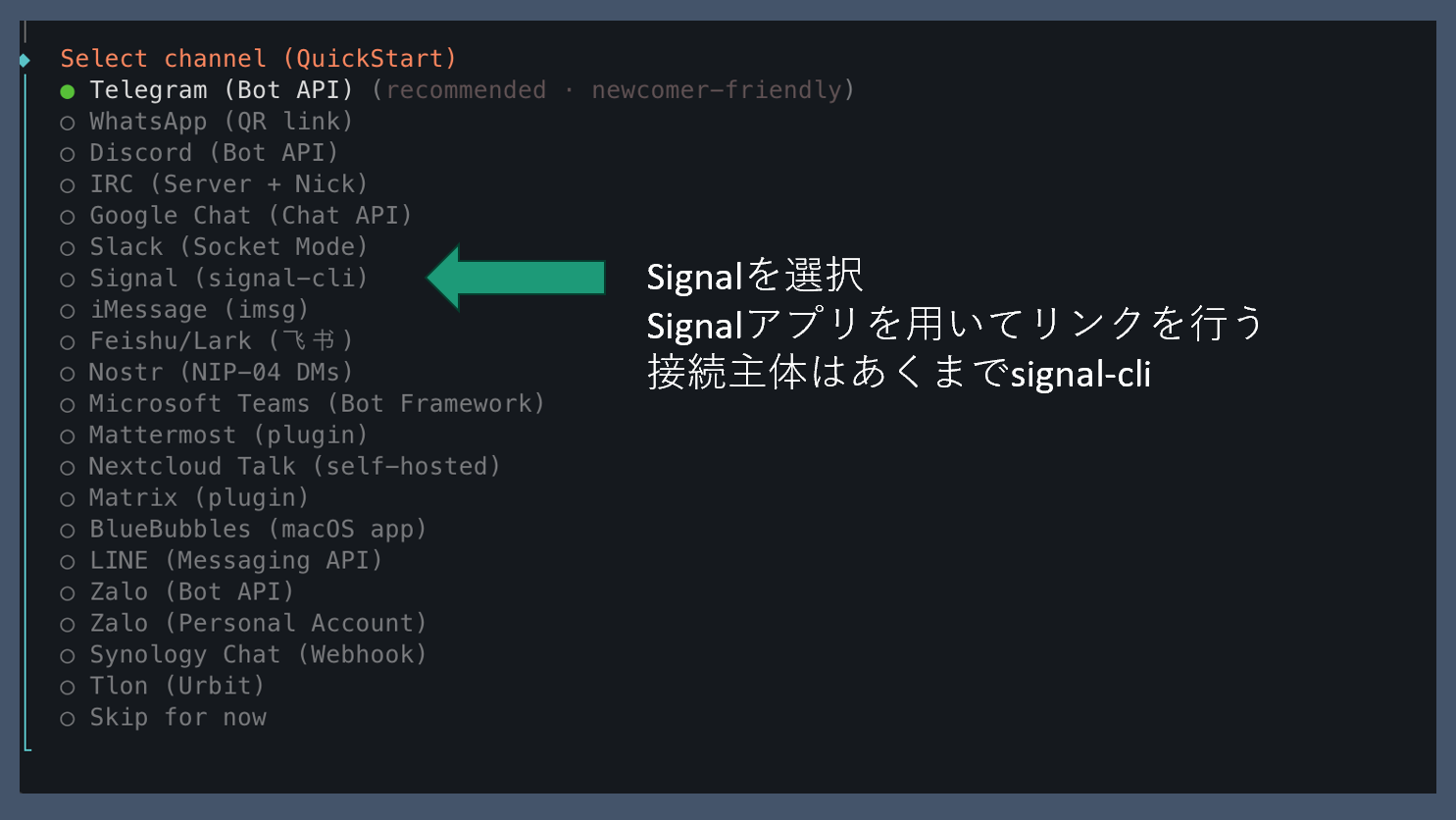
There are many options, but I chose Signal. Signal does use your phone number for account creation and contact syncing, but messages are encrypted in transit and it is designed to minimize metadata, so it's fair to call it a highly anonymous app.
💡
The reason it says signal-cli is that OpenClaw can't connect directly to the official Signal app via an API, so it connects by linking through signal-cli.
Bitcoin Research Lab has a previous article on Signal by Kishin Kato, so be sure to read that as well.
SignalがeCashによるビットコイン決済を導入すべき理由 | Mobilecoinはなぜユーザーに普及しなかったのか
Signalが導入したMobilecoin決済機能の問題点を指摘し、最近登場したビットコインのeCashを導入させる運動を紹介します。その根拠として、Signalの特性に照らし合わせてビットコインのeCashが最適である理由も説明します。
加藤 規新
💡
Nostr (NIP-04 DMs) is among the chat app options, but NIP-04 is an older protocol with many known vulnerabilities and is now deprecated.
Summary
In this article, I walked through a full setup for running OpenClaw with No KYC.
To start with, OpenClaw is a personal AI agent that carries out real tasks such as sending emails, managing your calendar and checking websites, just from instructions you send through a chat app. Its flexibility to run either in the cloud or self-hosted has won it a lot of support.
The key points of the No KYC setup come down to three things.
For the VPS environment, use LNVPS, which accepts Bitcoin payments over Lightning and lets you sign in with Nostr public key authentication. You don't need an email address or a credit card, and you can spin up a server starting from a few thousand yen a month.
For No KYC AI inference, use Routstr. Instead of the OpenAI or Anthropic API keys you'd normally need (which require registering a credit card), you can use inference simply by pasting a Cashu token into Routstr. Cashu is a prepaid token, and with a wallet like Minibits you can easily top it up over Lightning.
For the chat app, I went with Signal, which encrypts messages and is designed to minimize metadata. Among the many options, including WhatsApp, Telegram and Discord, Signal is the realistic choice if you prioritize privacy.
Combining these gives you an environment where you can run an AI agent while keeping the exposure of your personal information to a minimum. The biggest benefits of running OpenClaw with No KYC are a lower risk if your data leaks, activity logs that aren't tied to your identity, and a trustless design that eliminates the need to trust third parties.
Note that the information in this article is current as of late February 2026, and the specifications of each service may change. When doing the actual setup, refer to the official documentation and proceed at your own risk.