Claiming BIP-110 and ECX Fork Coins Without Replay Protection

This article was translated from Japanese with AI. Read the original (日本語) · Report a translation issue
Since the summer of 2026, several Bitcoin fork coins have appeared that are attracting attention for the first time in years. Besides the so-called BIP-110 chain, which Bitcoin Research Lab has also covered (it goes by various names, including Bitcoin Blake2B, BTCB2 and XBT), a fork coin called Ecash (ECX), which implements BIP-300 and BIP-301 (drivechains), is scheduled to launch in October.
Because none of these fork coins has (or is expected to have) much of a user base, none of them implements replay protection, a deliberate difference from Bitcoin. As a result, broadcasting a transaction that sends a fork coin risks unintentionally sending your bitcoin to the same destination as well.
Despite that risk, fork coins deliberately choose not to implement replay protection. Today I'll explain why, and then walk through exactly how to safely claim the fork coins on the BIP-110 chain and the Ecash chain.
💡
Bitcoin Research Lab has written several times about eCash, a technology for managing balances without a blockchain, but it is a completely different thing and has nothing to do with the fork coin discussed here.
💡
The methods for claiming coins described in this article can lead to sending funds to the wrong place or losing your own coins by mistake if carried out incorrectly. This article is provided for informational purposes only. If you send bitcoin or fork coins based on it, you do so at your own risk.
What is replay protection?
Let's start by looking more closely at why replay protection is needed in the first place.
Replay attacks
When you send bitcoin, you broadcast transfer data called a signed Bitcoin transaction to the network and wait for it to be mined. Each node on the network then checks the transaction it receives against Bitcoin's consensus rules and other criteria to verify that it is valid.
Now, imagine a fork coin with no changes whatsoever from Bitcoin. (Let's set aside for the moment why anyone would fork it.) If you create a transaction that sends this fork coin, its contents are exactly the same as a transaction that sends bitcoin.
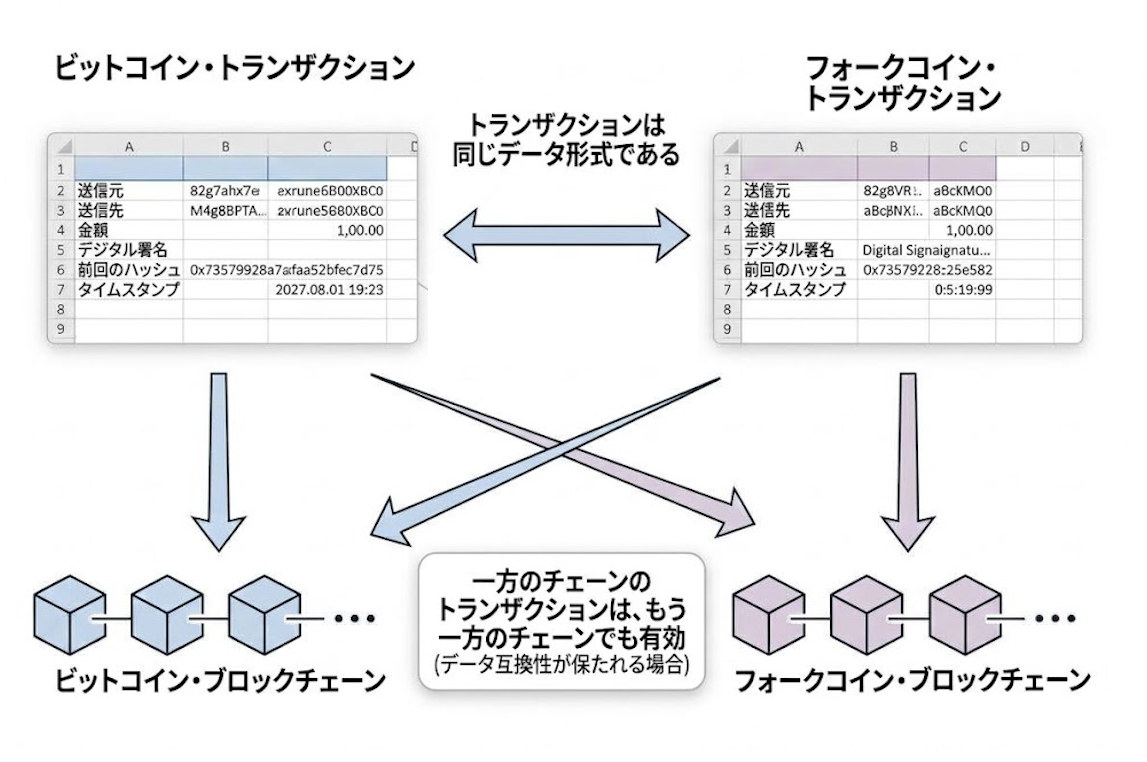
If you create a fork coin transaction and only fork coin miners mine it, then of course only the fork coin will be sent. But if even one troublemaker sees that transaction and broadcasts it to the Bitcoin network as well, your bitcoin may get sent too! The reverse is also true: if you send bitcoin without knowing the fork coin exists, you may unknowingly send the fork coin along with it.
This is called a replay attack. The parties with an incentive to carry one out are mainly recipients who want the coins on the other chain as well, and miners who can collect transaction fees on the other chain.
リプレイ攻撃とは?攻撃の仕組みや対策を解説
この記事では、サイバー犯罪者が行うリプレイ攻撃についての解説や、被害に遭わないための対応策を詳しくご紹介します。
 Kaspersky
As a general security term, a replay attack means storing a legitimate message and rebroadcasting it later to impersonate the legitimate sender. In Bitcoin, the term usually refers to someone other than the sender rebroadcasting a transfer made on one chain onto another chain
Replay protection as a countermeasure
The countermeasure to replay attacks in Bitcoin, replay protection, means that a transaction valid on one chain is invalid on the other, in both directions. With it, you can keep using your bitcoin without losing your fork coins, or send only your fork coins with peace of mind.
There are two kinds of replay protection:
- Protocol-level replay protection. The fork coin's transaction format is deliberately changed from Bitcoin's, so that fork coin transactions and Bitcoin transactions are no longer compatible. This protects all users.
- Manual replay protection. You protect your own wallet by creating transactions that are valid on only one chain. It's up to each user to do this.
When people say a coin has no replay protection, they generally mean at the protocol level. In that case, each user has to apply replay protection manually.
Why fork coins are sometimes released without replay protection
Reading this far, you probably feel that the lack of replay protection has serious downsides: it inconveniences users and exposes them to the risk of losing fork coins or bitcoin without realizing it. In fact, many users who aren't aware of this are probably sending their fork coins along with their bitcoin whenever they make a Bitcoin transfer.
Fork coins are nonetheless released without protocol-level replay protection because keeping the transaction format identical to Bitcoin's means existing Bitcoin wallets can be used as-is for the fork coin. For a fork coin with a small user base in particular, wallets can't be expected to add dedicated support, so being able to use the same tooling as Bitcoin itself is a major attraction.
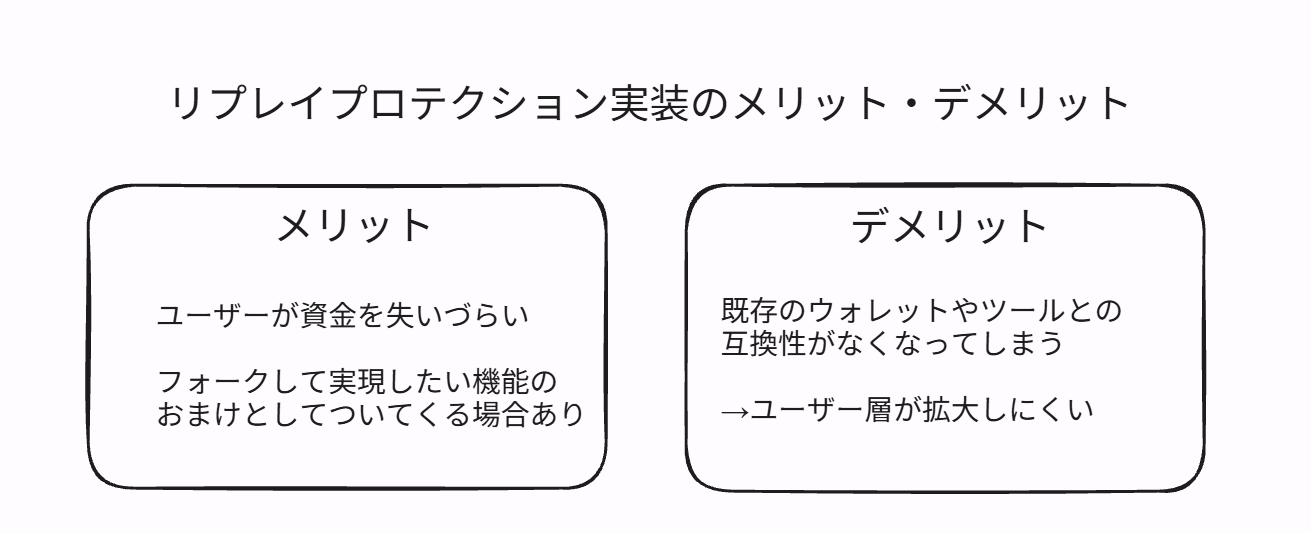
In other words, skipping replay protection lets a fork coin reuse existing Bitcoin wallets, open source software and so on without modification, which helps preserve usability. That dynamic tends to push fork coins toward launching without replay protection.
What you need to claim fork coins
Now let's look at exactly how to separate BIP-110 chain and ECX chain coins from the bitcoin you hold. To do this, a few prerequisites have to be met.
Self-custody is a must
First of all, there's nothing you can do about coins held on an exchange or anywhere else where you can't create the transactions yourself. You can ask the exchange to support the fork, but in most cases they won't, given the cost and risk involved. Unless the fork coin is very large, don't expect exchanges to support it.
Also, use one of the nodes or block explorers described below to confirm that you actually hold the fork coin. Generally, the UTXOs you held at the moment of the fork should have been copied over to the fork coin side. It's also possible that coins have been sent to you since then, or that you've unknowingly sent some away.
You need a node or block explorer
Many people run their own Bitcoin node, and there's a wide choice of block explorers, but fork coins are often vastly smaller, so the options for running a node may be limited and there may be no block explorer at all. Still, you need these to check your balance on the fork coin side and to broadcast transactions, so get hold of whatever is available.
Because of transaction replays, people or exchanges who didn't notice the fork may have sent you coins after the fork coin was created, so check for that too.
Using a block explorer instead of a node comes with privacy drawbacks, so if privacy matters to you, take countermeasures such as running your own node. In that case, you'll need to do something like pointing Sparrow at a fork coin node.
チェイナリシスは何を見ている?ビットコイン送金のプライバシー漏洩ポイントと守り方
ビットコイン送金のプライバシーはどこまで見られている?チェイナリシスなど解析企業が使う関連付け手法と、一般ユーザーが取れる具体的な対策を解説します。
 加藤 規新

Market value
Last but not least, unless the fork coin is traded somewhere (or is expected to be) and has a market value that justifies the risk and effort of claiming it, there may be no point in going to the trouble. Once you factor in the risk of making a mistake, the privacy risk and other considerations, some people may find the break-even point is quite high.
For reference, at the time of writing, Bitcoin Blake2B appears to be trading at around $600 per coin. ECX hasn't had its production launch yet, so it has no price with meaningful liquidity.
How to claim Bitcoin Blake2B (BIP-110)
Bitcoin Blake2B (the coin on the BIP-110 chain) has no protocol-level replay protection, but because its difficulty was reset after the fork, its block height is several thousand blocks ahead of Bitcoin's. You can use this to apply replay protection manually.
The tools used in this walkthrough are:
• Block explorer and transaction broadcast mechanism: Mempool.guide (needed if you don't run a Bitcoin Knots node)
• Wallet: Sparrow Wallet
Sparrow Wallet has a solid reputation as a Bitcoin wallet for advanced users. We've covered it in a previous article, so be sure to check that out.
Sparrow Walletのススメ | ビットコインの技術に詳しくなりたい上級者向けPC用ウォレット
ビットコインの上級者ユーザーや技術者に評判のよいSparrow Walletを紹介する記事です。ウォレットの作成方法、マルチシグやハードウェア対応についての説明のほか、新しいプライバシー機能であるSilent Paymentsやトランザクションのプライバシー面の最適化について解説します。
 加藤 規新

First, open Sparrow Wallet. The UTXOs you held as of block height 961,632 were duplicated on the BIP-110 chain, so identify which UTXOs those are. In some cases, Bitcoin Blake2B may also have arrived via a replay attack in UTXOs you received after that point, so include those in your check as well.
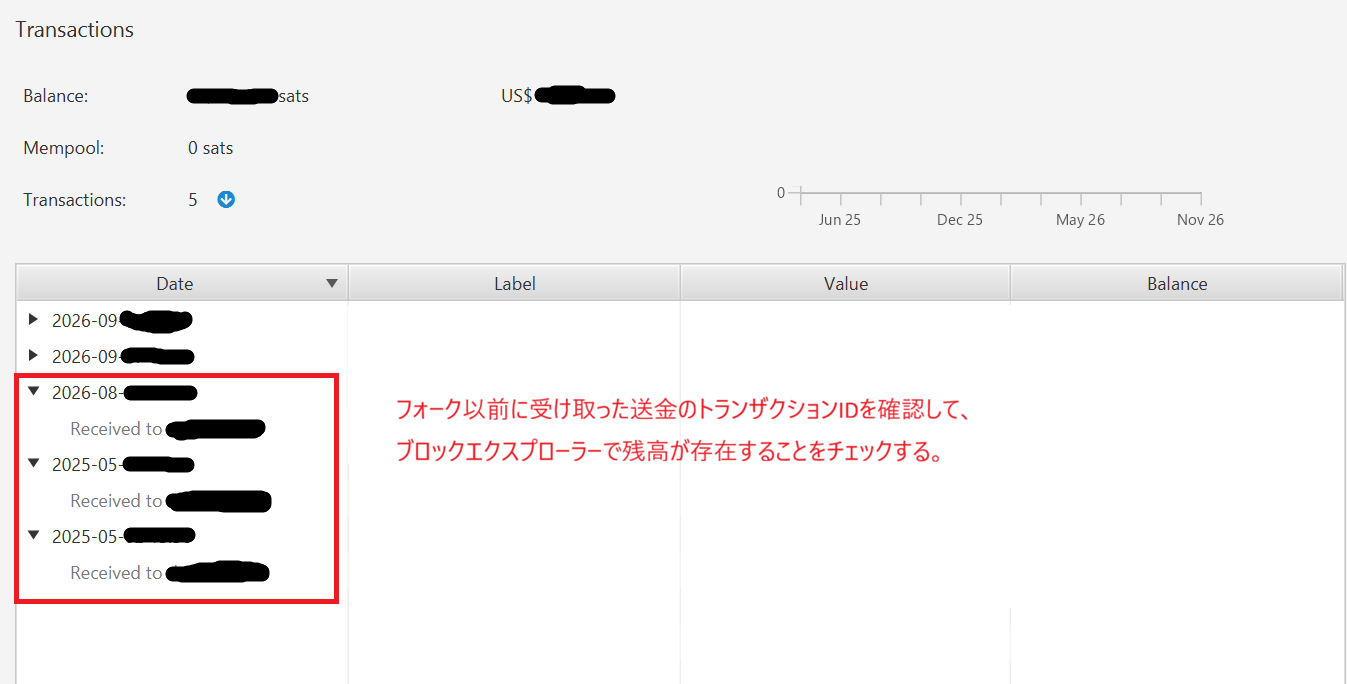
Next, use Mempool.guide or your own Bitcoin Knots node to confirm that those UTXOs really exist on Bitcoin Blake2B. If a UTXO doesn't exist there, you can't use it when creating the transaction.
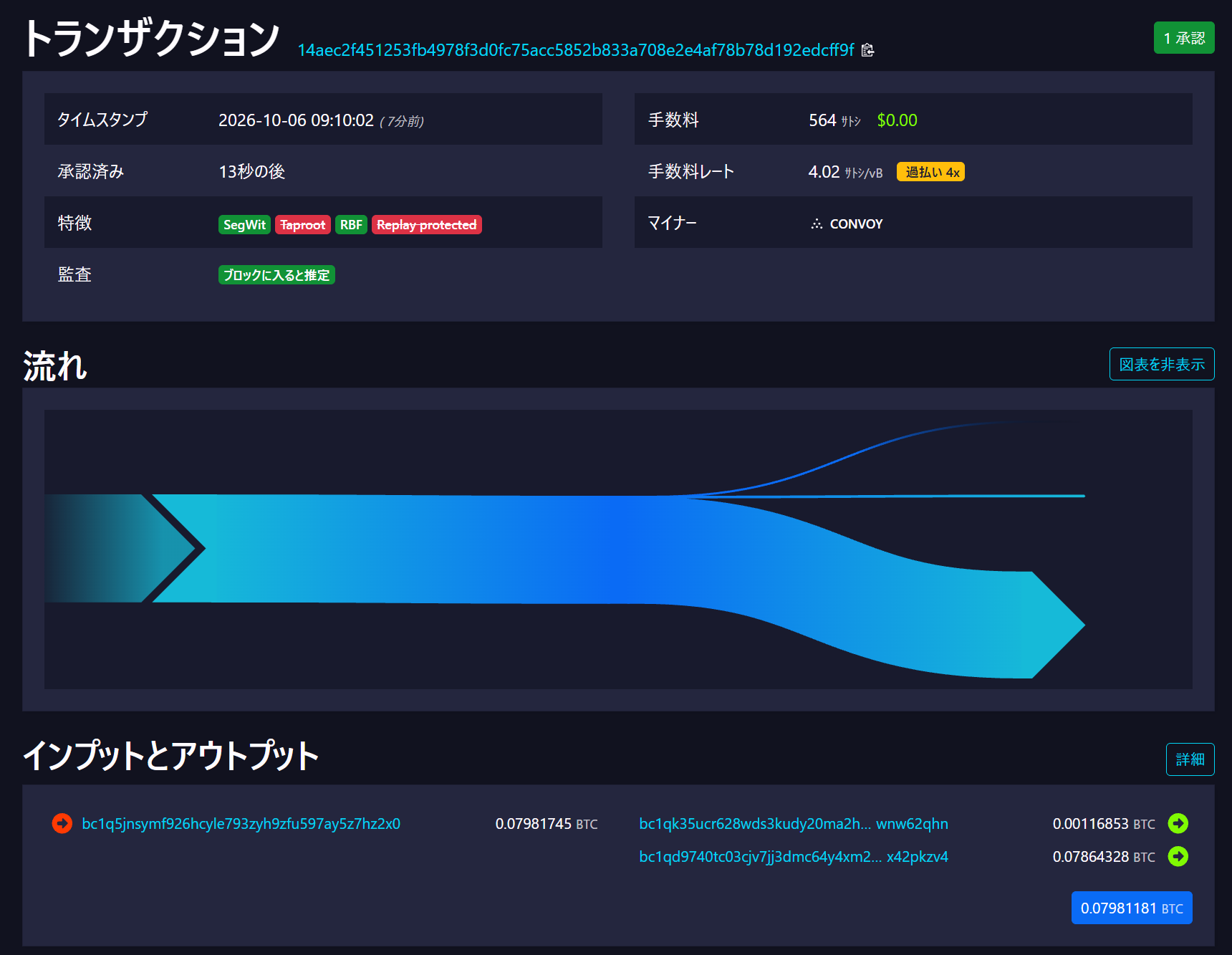
Once you've confirmed you hold the fork coin, the next step is sending it safely.
Bitcoin transactions have a feature called nLocktime, which makes a transaction usable only in the future: "valid from this block onward." By setting nLocktime to a block height that only BTCB2 has reached and that is well in the future for Bitcoin, you can prevent replay attacks for a certain period. (This lets you create a transaction that is valid only on the BTCB2 side.)
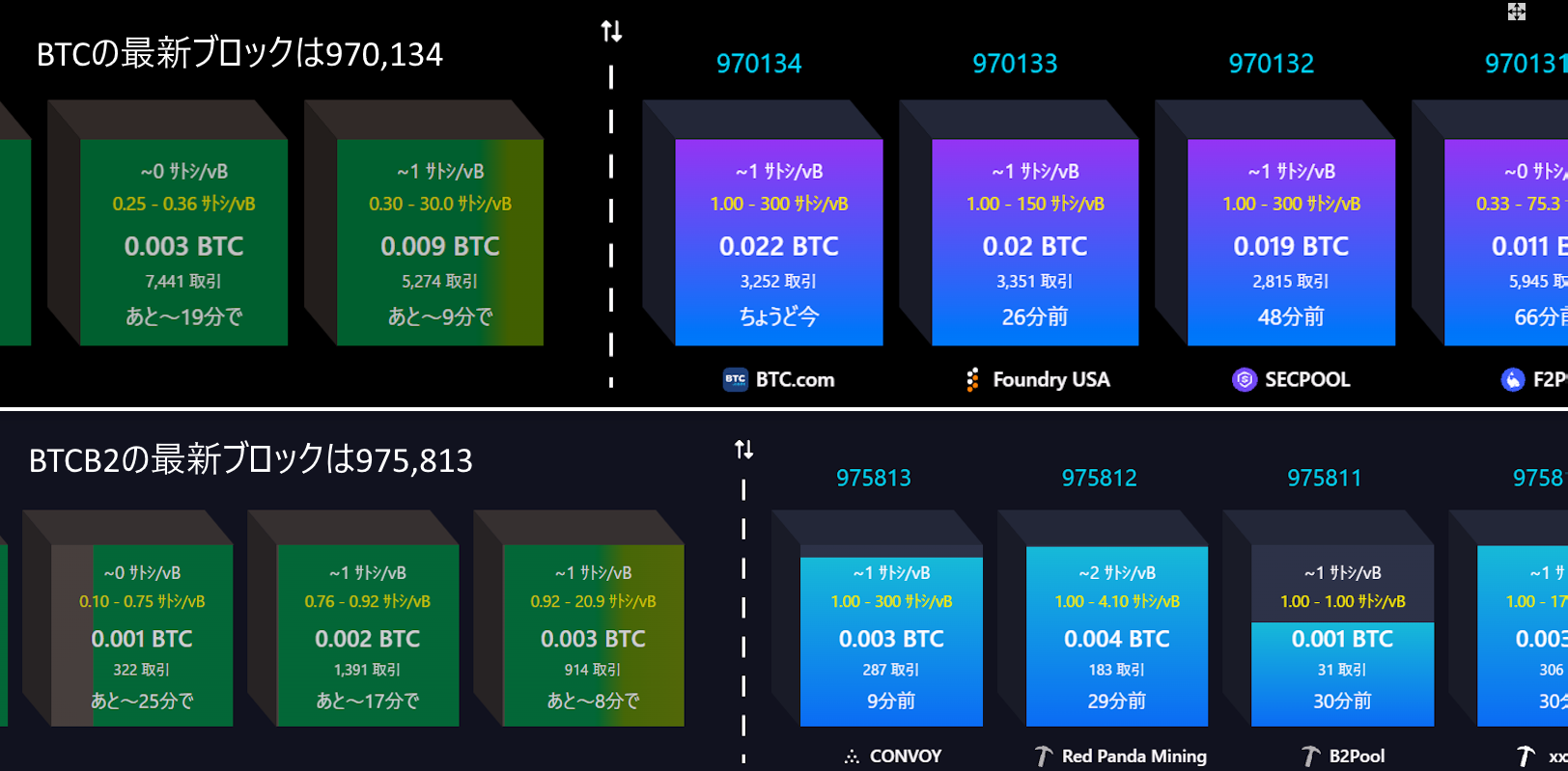
So the steps are:
1. Send your BTCB2 with an nLocktime that is valid only on BTCB2
2. Once the BTCB2 transfer has enough confirmations, spend at least one of the UTXOs consumed by each transaction in a separate transaction on the BTC side
In Sparrow Wallet, the nLocktime setting is on the last page of the transaction creation screen, under the Detail tab. See the images below.
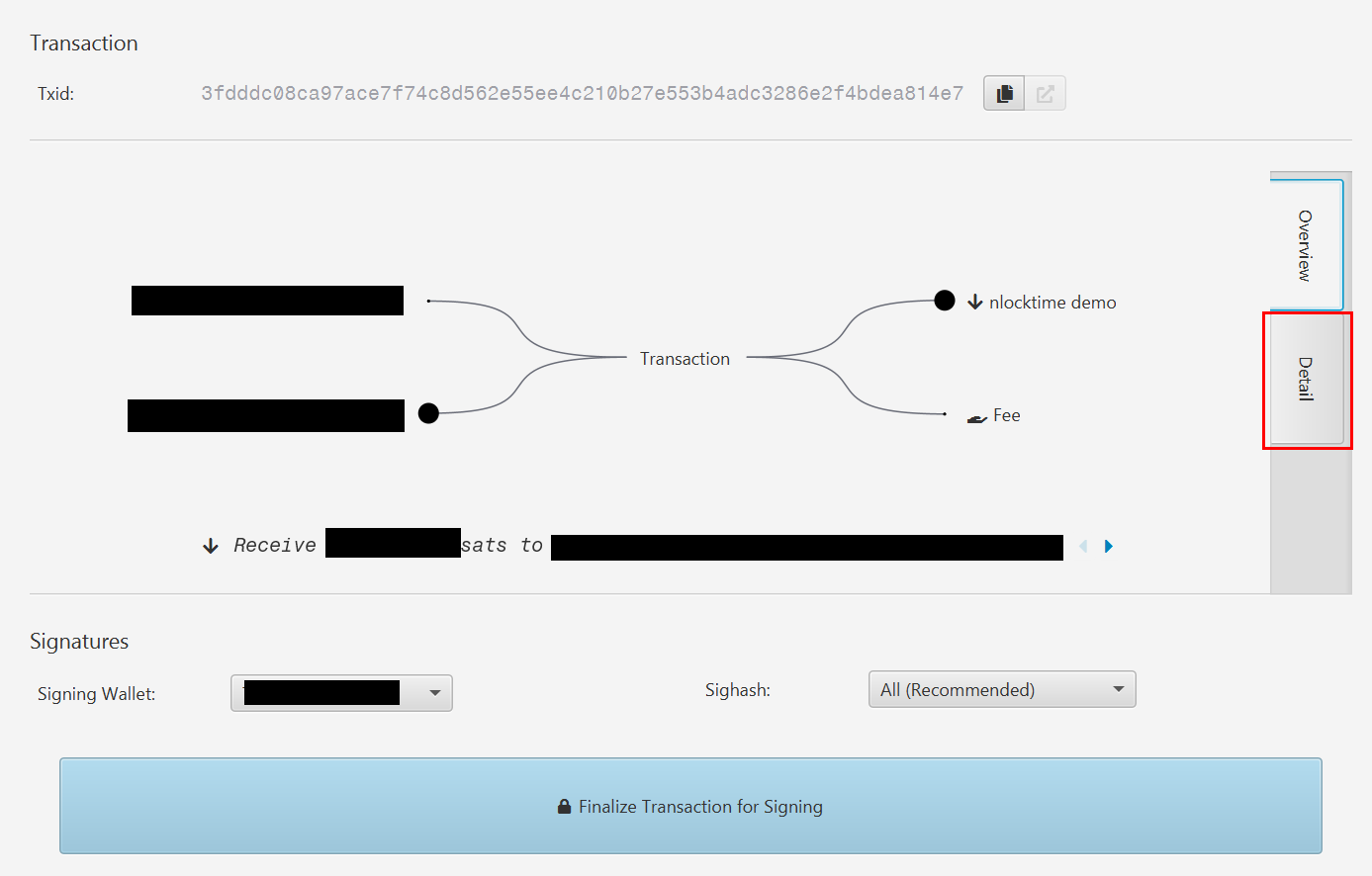
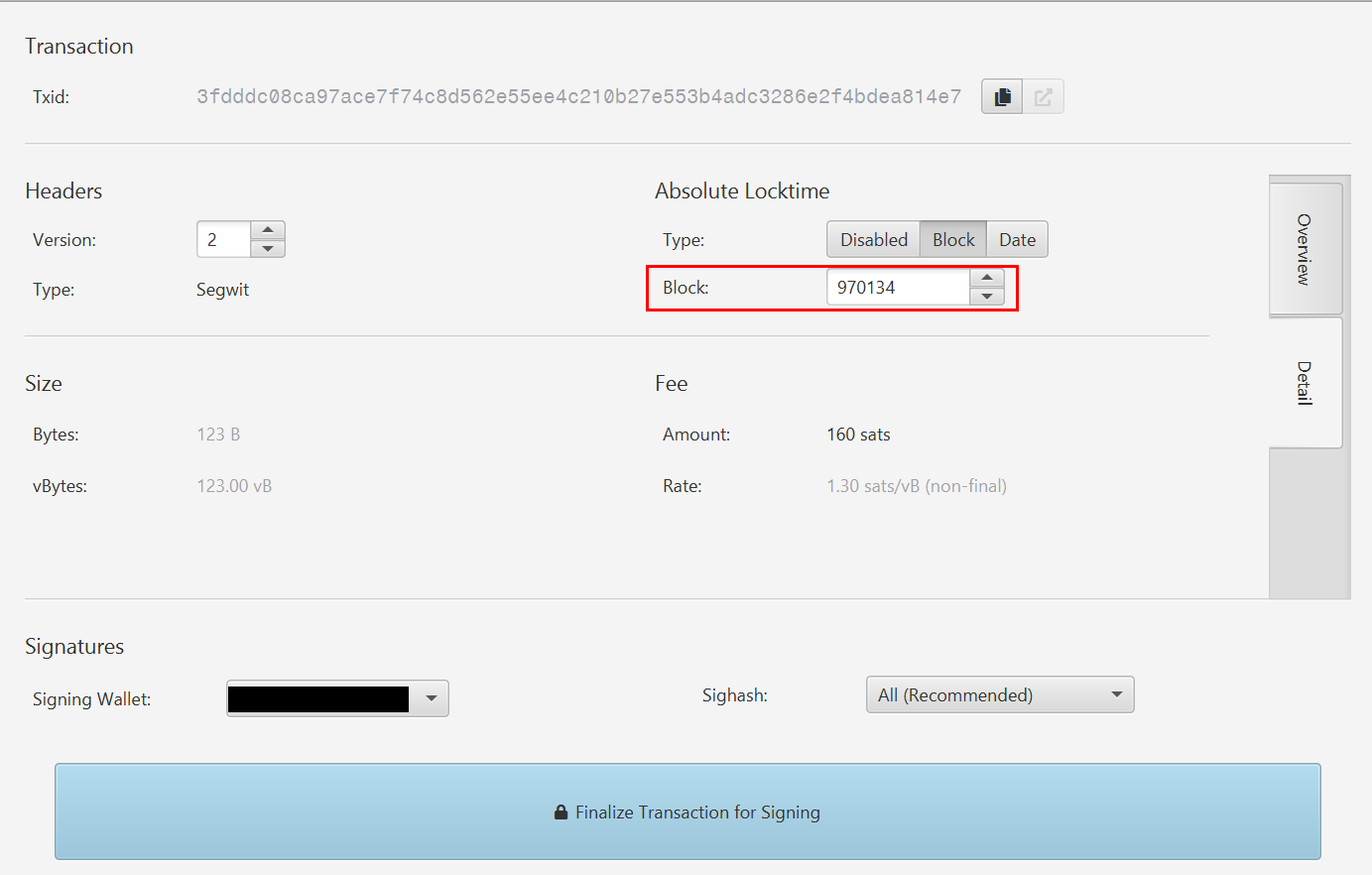
When you broadcast a transaction created and signed this way, it can't be replayed on the Bitcoin side yet, so in due course the transfer completes on the BTCB2 side only.
💡
In case a mistake causes your BTC to be sent as well, we recommend sending to a wallet address you control when separating coins
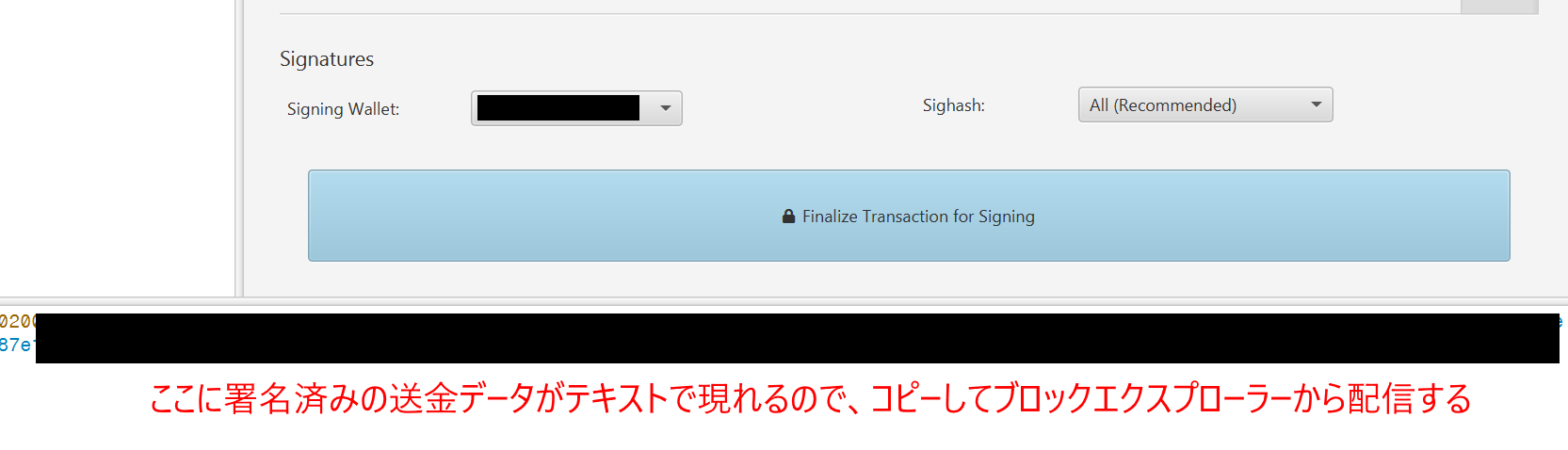
However, if you leave it like this, the Bitcoin side will reach the nLocktime in a few dozen days and the transaction could be replayed. So before then, send at least one of the UTXOs consumed by your BTCB2 transaction to yourself on the BTC side too, so the transaction can no longer be replayed. If that sounds difficult, the safe option is simply to send all of your BTC to yourself (though this has privacy drawbacks).
How to claim ECX
The tools used for ECX are:
• Block explorer:
https://explorer.beta.ecash.ninja/ (Betanet, which split off at block 967,680)
• Wallet: Sparrow Wallet
The production fork hasn't happened yet, but ECX has carried out two practice hard forks, so you can do a dry run of claiming coins. Alphanet, created by the first hard fork, has already been shut down, so it looks like you can no longer claim coins from it. ECX doesn't have anything that really qualifies as protocol-level replay protection, but it does include a small rule difference that can be used for manual replay protection.
ECX introduces a small protocol change: if nLocktime (which came up earlier) is set to exactly 499,999,999 (the maximum value allowed for an absolute timelock), the transaction is valid at any time. So by creating a transaction with nLocktime set to 499,999,999, you get a transaction that will be invalid on the Bitcoin side for the foreseeable future.
💡
Update, October 29, 2026: At the mainnet launch, the allowed nLocktime value was changed to 499,999,998 to prevent replays of Alphanet/Betanet transactions. Use this value on mainnet.
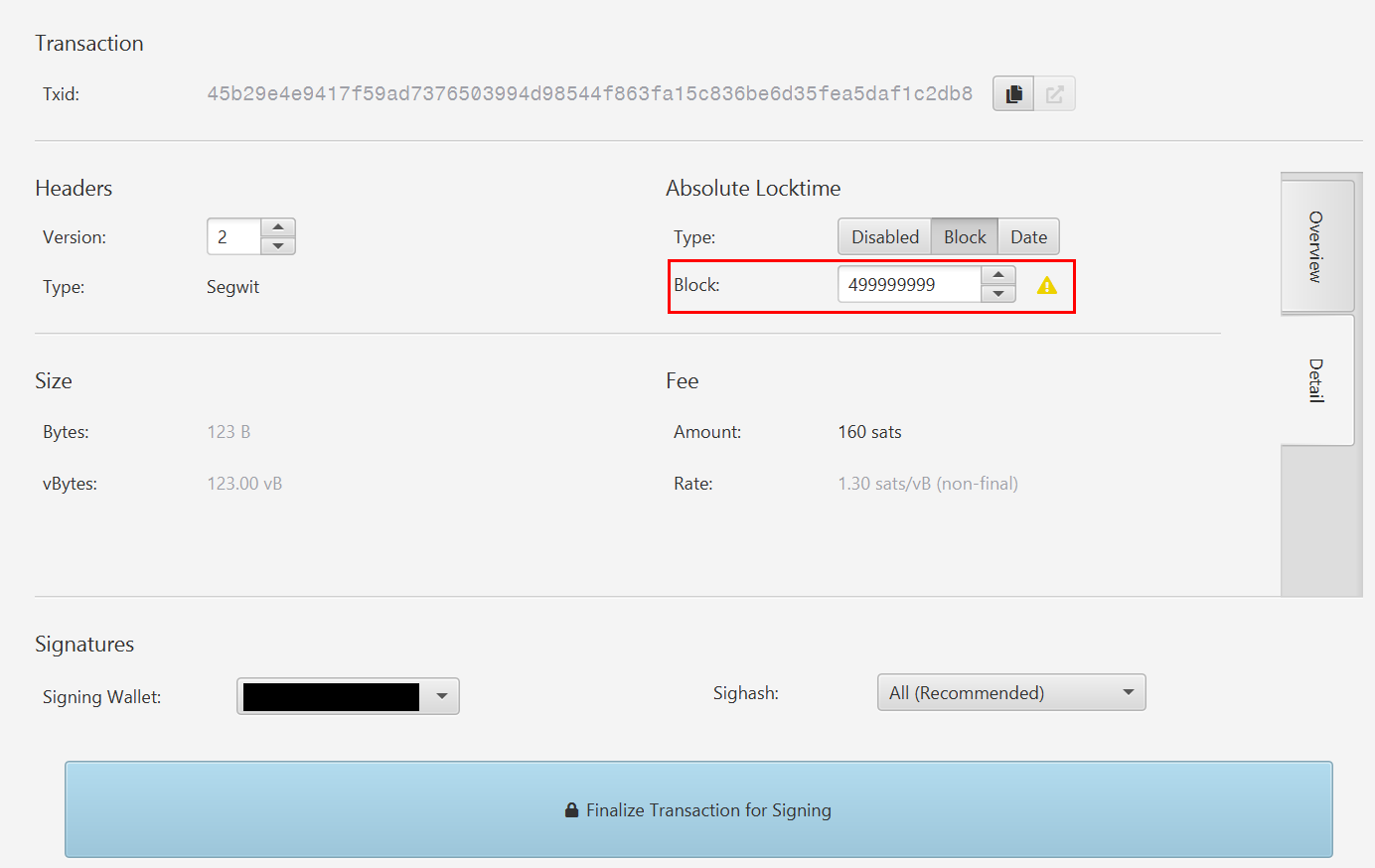
As before, broadcast the transaction from the block explorer's page.
As with BTCB2, a replay becomes possible once the nLocktime is reached, so strictly speaking it's best to afterward send at least one of the UTXOs consumed by your ECX transaction to yourself on the BTC side as well. (If you're worried, you can send all of the UTXOs.)
That said, nLocktime 499,999,999 won't be reached for about 9,500 years, so in practice it's probably not a big deal if you skip the self-transfer. Even so, I think it's best practice to do it anyway.
As you can see, Sparrow users can separate fork coins from their bitcoin with a few small tweaks.
Risks to consider when claiming fork coins
As mentioned earlier, claiming fork coins carries several risks, so it's best to do it only when you expect a return that justifies them.
Privacy risk
When you spend UTXOs on the Bitcoin side and the fork coin side, third parties may be able to piece together the full picture of your holdings using techniques such as the Common Input Ownership Heuristic.
It's easy to collect the transaction history of the BTCB2 and ECX chains and treat it as an extension of BTC's transaction history, because the holders of the coins at the time of the fork can be assumed to be the same. For details, see our previous article on chain analysis and Bitcoin privacy.
チェイナリシスは何を見ている?ビットコイン送金のプライバシー漏洩ポイントと守り方
ビットコイン送金のプライバシーはどこまで見られている?チェイナリシスなど解析企業が使う関連付け手法と、一般ユーザーが取れる具体的な対策を解説します。
 加藤 規新

Risk of losing your own coins by mistake
In the examples above, if you set nLocktime incorrectly, the same transaction could be replayed on the BTC chain, and you might end up sending your bitcoin to the person you meant to send BTCB2 or ECX to. There's no guarantee you'll get it back. So for the transaction that separates your fork coins, send to a new address that you own.
Of course, you also need to check the recipient and amount, just as with any ordinary transfer.
Risk of losing coins to a shady platform
Also, once you've gone to the trouble of separating your coins, don't let the lure of profit trick you into sending them to a dubious exchange or wallet with a high risk of running off with your funds.
Summary
In this article, I explained what it means for a Bitcoin fork coin to implement replay protection and why recent fork coins don't. I also showed how to safely separate recent fork coins such as BTCB2 and ECX from your bitcoin using Sparrow Wallet. I hope you find it useful.
When sending bitcoin or fork coins, check the details and destination carefully, take great care to avoid mistakes, and proceed at your own risk.