Sparrow Wallet: Desktop Bitcoin Wallet for Advanced Users

This article was translated from Japanese with AI. Read the original (日本語) · Report a translation issue
Which Bitcoin wallet do you use day to day?
Bitcoin wallets have made big strides in UX in recent years, and mobile wallets in particular now come in many simple, easy-to-use options. That is welcome progress for Bitcoin adoption, but the ease of use comes at a cost: the options and menus that intermediate and advanced users rely on have been stripped out, and fine-grained settings are no longer available.
As a result, the choice of wallets for advanced users has narrowed considerably: Zeus or BlueWallet on mobile, Electrum or Sparrow on desktop. If you want advanced features such as multisig or support for a wide range of hardware wallets, you will often have no choice but to use a desktop wallet.
Today I want to introduce the strengths of Sparrow Wallet, which has become the go-to desktop wallet among experienced Bitcoiners. It is a wallet I especially recommend trying if you want to deepen your understanding of how Bitcoin works.
Sparrow Bitcoin Wallet
Sparrow is a modern desktop Bitcoin wallet application supporting most hardware wallets and built on common standards such as PSBT, with an emphasis on transparency and usability.
 GitHub

💡
Fake sites on lookalike domains are distributing counterfeit executables, so be extremely careful whenever you download anything, and double-check against the official GitHub, the official Twitter account and similar sources.
I also explain this in a video, so feel free to watch it too.
Its selling point is features, not simplicity
Sparrow Wallet's UI is, to put it mildly, not glamorous. It looks more like business software than a consumer app.
Its biggest selling point, though, is a feature set rich enough to satisfy almost any advanced Bitcoiner.
Let's start with one of the first things you should check in any Bitcoin wallet: the server connection settings (File > Settings > Server). Sparrow Wallet lets you choose between Public Server, Bitcoin Core and Private Electrum, and you can also enter proxy settings if, for example, you want to connect over Tor.
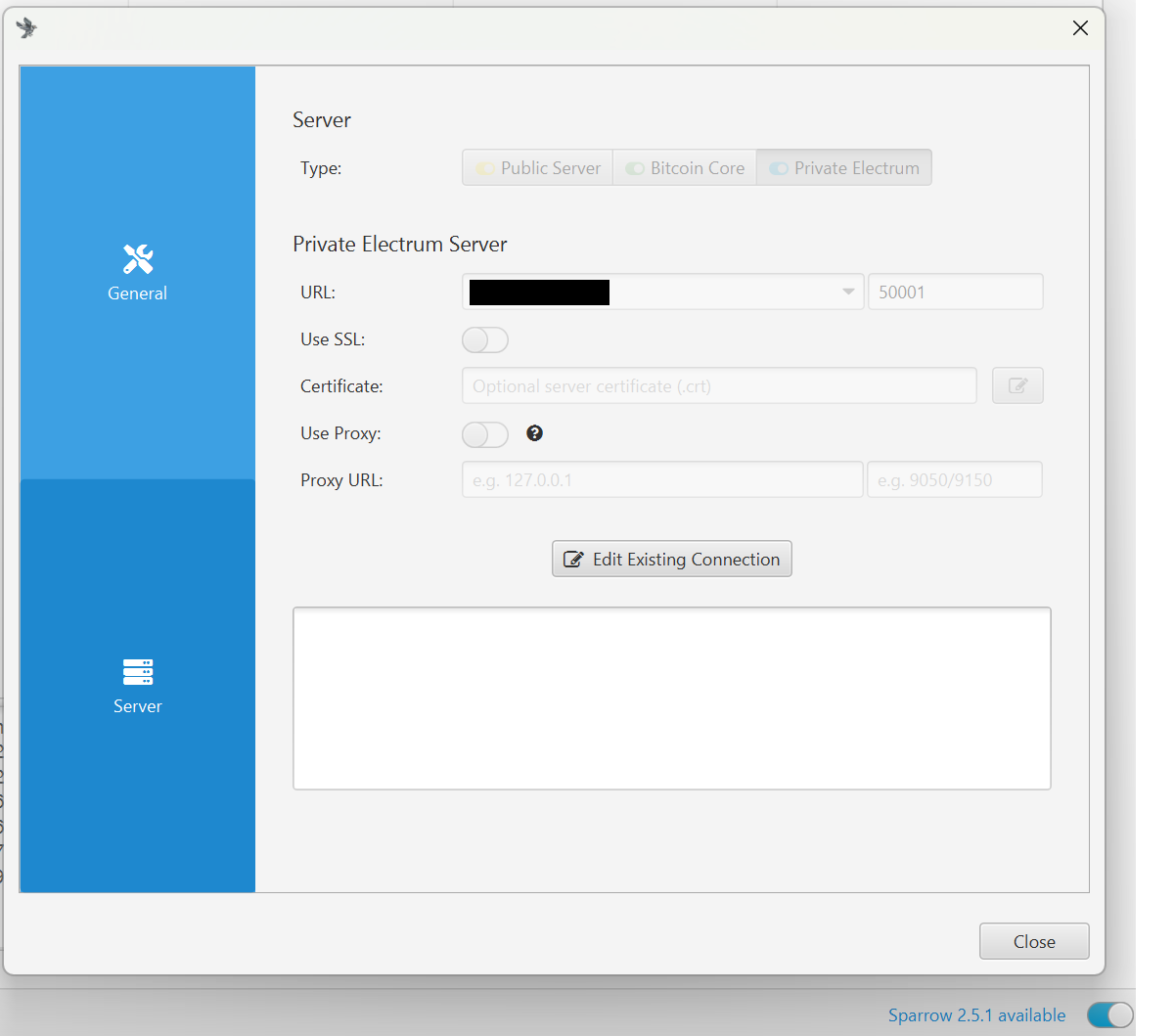
For privacy, the best option is to query a Bitcoin Core node or Electrum server that you run yourself. Otherwise, you not only have to reveal the many Bitcoin addresses in your wallet, including unused ones, to a third party, but you also have to trust whatever results that third party returns. I connected to an Electrum server I set up with Umbrel.
You can pause and resume the connection with the toggle switch in the bottom right of the main screen. The color of the toggle also tells you at a glance whether you are connected to a Public Server, Bitcoin Core or Private Electrum. In the screenshot above it is blue, because it is connected to Private Electrum.
💡
To repeat: privacy around your holdings bears directly on your personal safety, so it is important to leak as little information as possible. Yet many wallets default to querying an Electrum server provided by the wallet operator (a Public Server). Quite a few wallets let you change this setting, so if you run a node with Umbrel or similar, be sure to set it as your wallet's server and put it to use.
That said, server connection settings are common in other wallets too. Let's look at the features where Sparrow Wallet really stands out.
Intuitive multisig and support for most hardware wallets
The first is how easy it is to create and use multisig wallets. When you create a new wallet (File > New Wallet), you are first asked to give it a name for identification. On the next screen, you can choose between a single-sig and a multisig wallet, and for multisig there are a variety of settings.
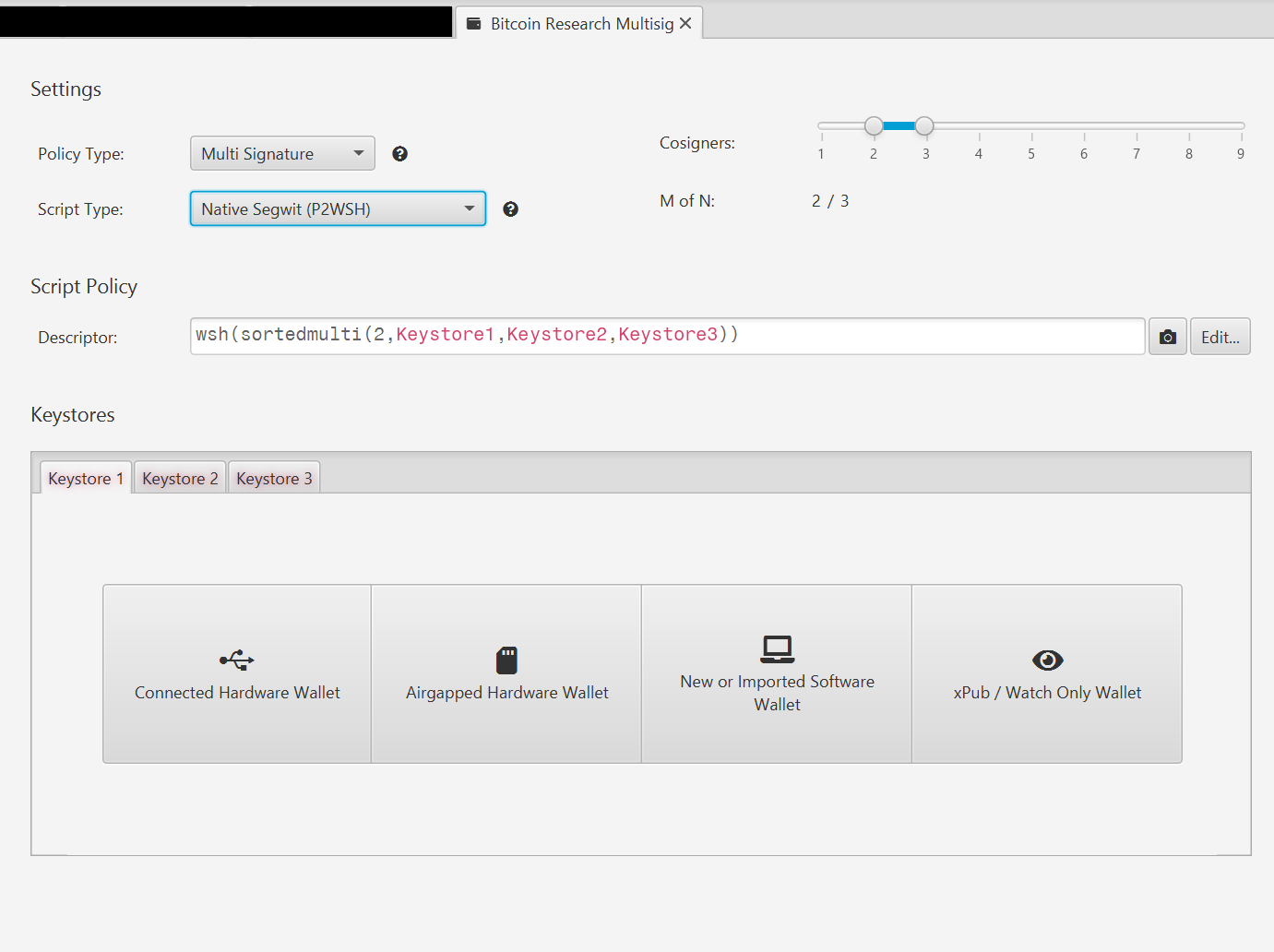
For example, the screen above creates a standard 2-of-3 multisig, but you can change the number of keys and the threshold with sliders. For each key, the Keystores section lets you register a key held in a hardware wallet or another wallet, import an xpub, or generate a new seed phrase. In general, Sparrow is best used together with hardware wallets.
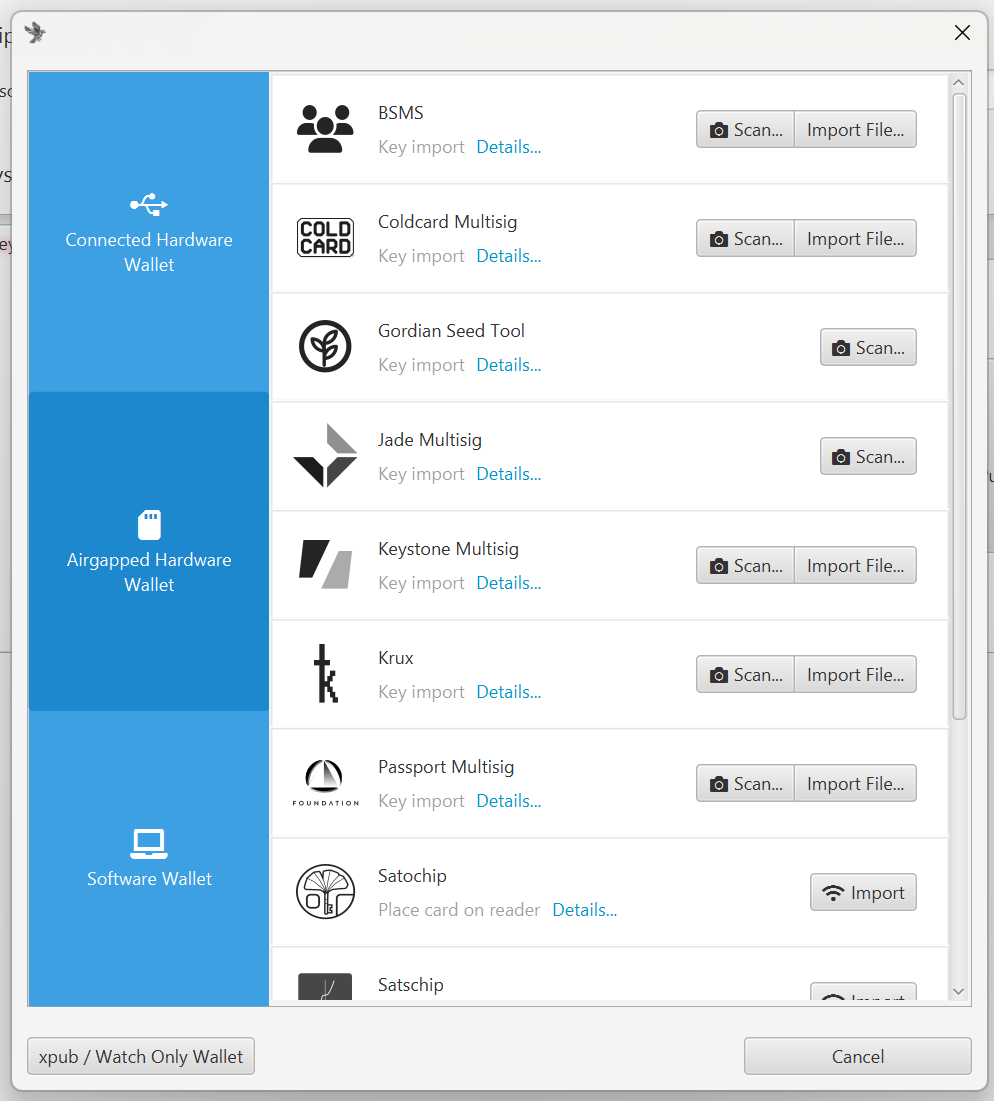
Because it supports almost every hardware wallet (HWW), it is easy to run a multi-vendor multisig setup that eliminates the risk of a vulnerability in any single HWW. Once you have registered as many keystores as there are keys and created the wallet, you can back it up as a PDF or a BSMS file (a file containing the list of public keys).
With multisig, besides the individual keys, you also need to back up the descriptor, which records which keys make up the multisig, so store this PDF or BSMS file where it won't be lost. (If it leaks, your funds cannot be stolen, but you will lose your privacy, so don't keep it somewhere anyone can see it.)
Note that for individuals there is no governance problem to solve, so I don't think you necessarily need to store your bitcoin in multisig. For the storage methods Bitcoin Research Lab recommends, see the article below.
【決定版】シードフレーズの安全な保管方法|NG例から分散管理まで
ビットコインのシードフレーズの安全な保管方法を、やってはいけないNG例(デジタル保存)から、紙/金属への手書き記録・物理分散・PIN保護の基本までわかりやすく解説。さらに不安な人向けにパスフレーズ、マルチシグ、シャミア秘密分散の強化策を紹介し、リスクに強い現実的な運用設計を提案します。
 三倉 大司
Sparrow's sending UI is also optimized for advanced users who want to keep learning about Bitcoin and for users who want to protect their privacy. For example, the screen for creating a transaction shows the following information.
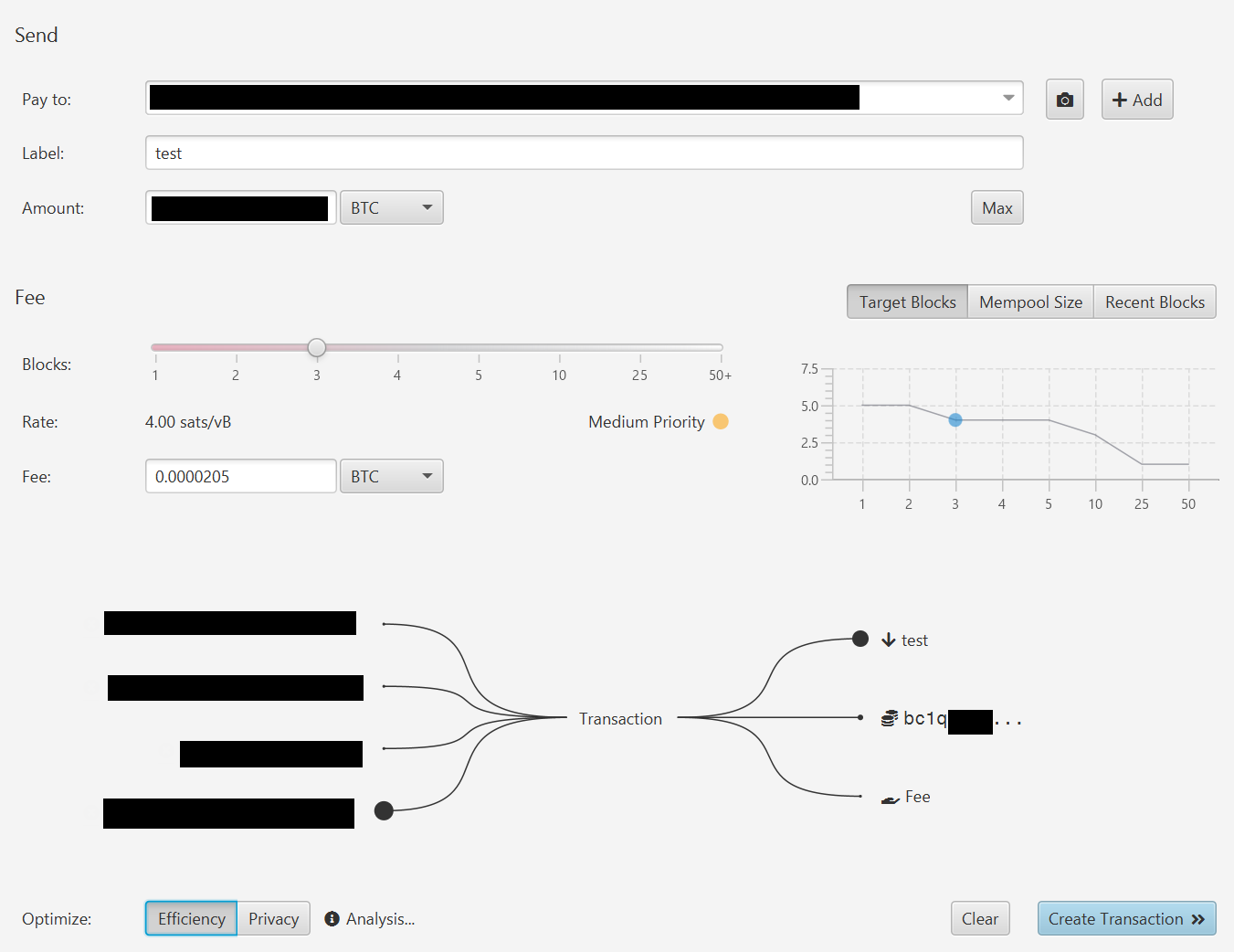
You can set the fee, of course, but what really stands out is the diagram at the bottom. On the left are the UTXOs being spent; on the right are the newly created UTXOs and the mining fee. Each one is shown with its label in Sparrow Wallet, and hovering over them reveals details such as "Change" (change sent back to the same wallet). By default the transaction is optimized to keep fees low (Efficiency), but hovering over Analysis shows how the transaction will look to chain analysis companies.

If you select Privacy, the transaction is rebuilt to protect your privacy as much as possible.
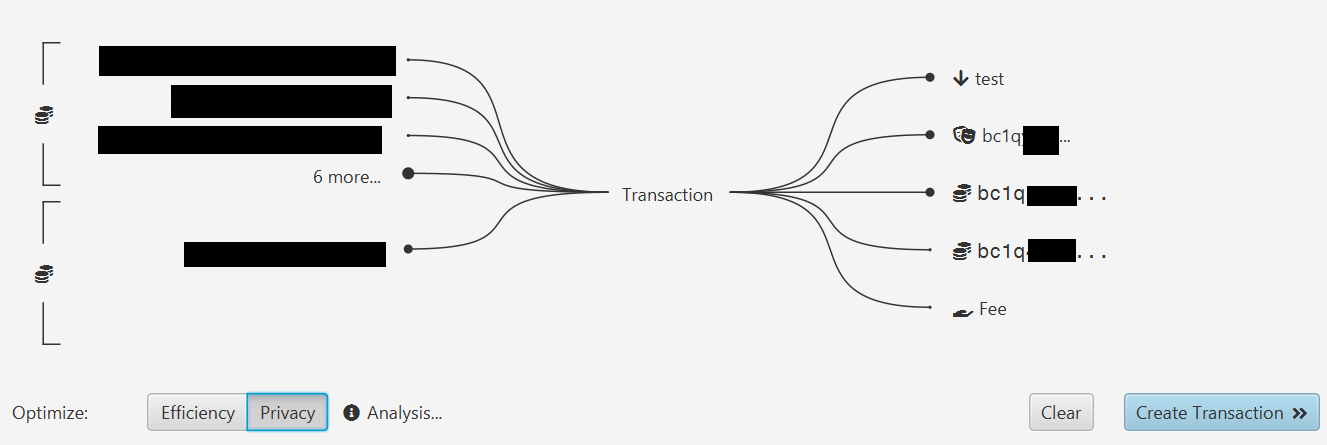
The UTXOs being spent on the left have been split into two groups whose on-chain histories do not overlap. On the right, Sparrow has created the real recipient address and amount, a "fake" recipient address for the same amount (actually one of your own addresses), and two change addresses. To outside observers, this looks like a CoinJoin (Payjoin) between two users, making on-chain tracking more difficult.
For more on Payjoin, see the article below.
CoinJoinの進化版としてのPayJoin
先日、コロナウイルスの影響もあってかVRが流行しているビットコイナーたち数十名が、Altspace VRというアプリを使って学会発表のようなものを行っていました。そこでのプレゼンテーションはPayJoinというCoinJoinの新形態についてでしたが、興味深い内容でしたので共有させていただきます。ちなみに、このようなイベントの企画が行われているBitcoin VR Degeneratesというテレグラムグループがあるので、参加したい方はどうぞ。 COINJOIN ご存知の方も多いかもしれませんが、CoinJoinとは複数の主体が1つのトランザクションに参加して、outputが誰のコインかわからなくする(混ぜる)ということが目的で行われます。プライバシーを向上することが目的の場合、inputとoutputの金額を比較されても完全には解析されないように、すべての参加者が一定の金額で行うことが多いです(0.1BTC単位のinputを任意の数追加して、出力として同じ数だけ受け取るなど)。そうすると、等しい金額のinputとoutputの対応は確率的にしか判断できません。この過程で問題視され
加藤 規新
The fee is naturally higher because the transaction is larger, but building a transaction like this by hand means a small mistake can wipe out the privacy benefit, so having it built automatically and sensibly is a very powerful feature. And if there is a UTXO on the left you don't want to spend, hovering over it shows a delete button, so manual coin control is also possible.
Silent payments support
Sparrow Wallet also supports advanced features that many wallets don't yet offer. What prompted this article, for example, is that it now supports not only sending to stealth addresses via silent payments but receiving them as well. (As a prerequisite, though, you need an Electrum server that supports silent payments, such as Frigate.)
GitHub - sparrowwallet/frigate: Frigate Electrum Server
Frigate Electrum Server. Contribute to sparrowwallet/frigate development by creating an account on GitHub.
 sparrowwallet
Frigate is an Electrum server with silent payments support, built by the Sparrow Wallet team
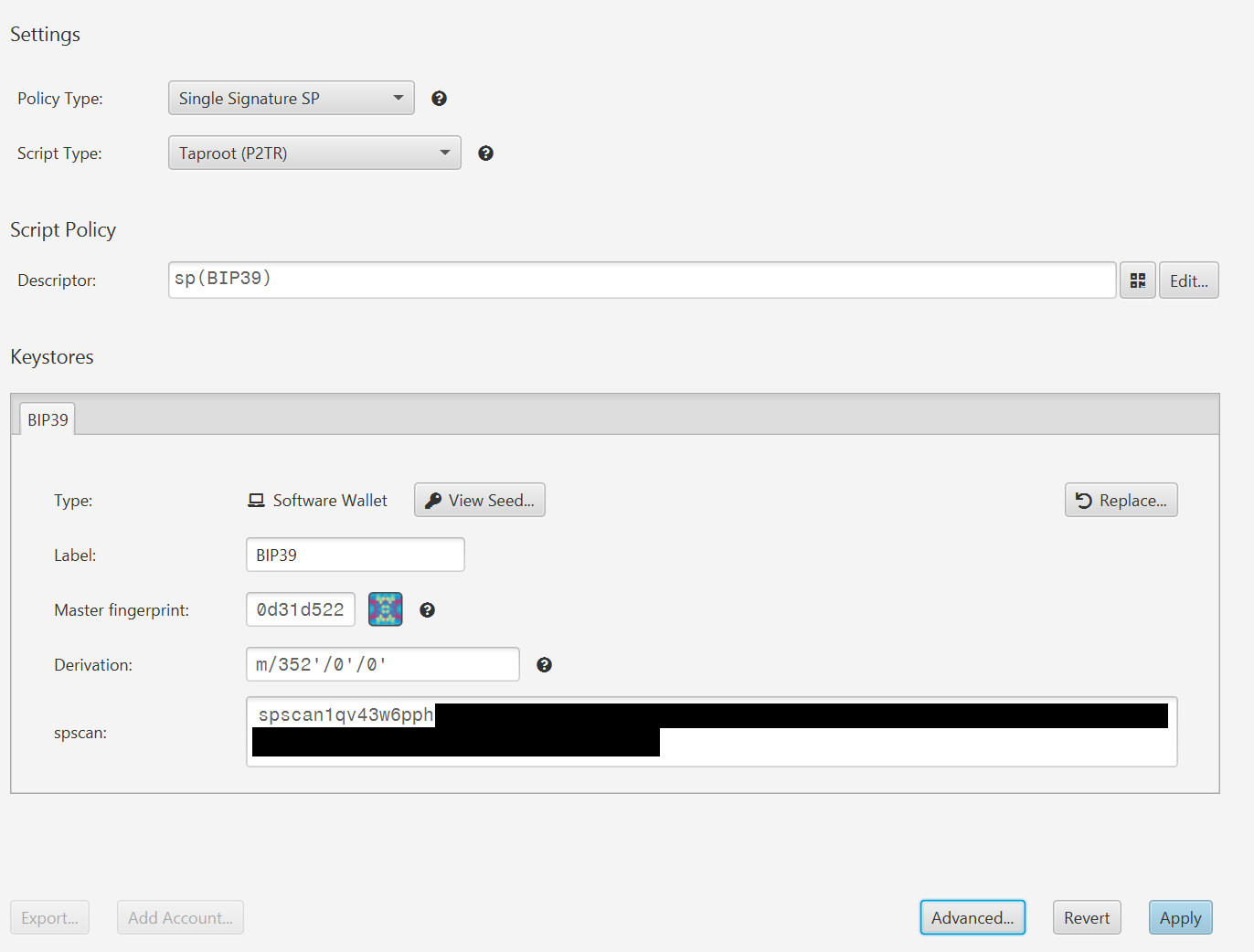
On the wallet creation screen, choosing Single Signature SP creates a wallet that can receive silent payments. The screen below is from a wallet I created by simply generating a new seed phrase, but hardware wallets and the like will become usable in the future as the HWWs themselves are updated. The string starting with spscan is the public key the Electrum server uses to scan the blockchain.
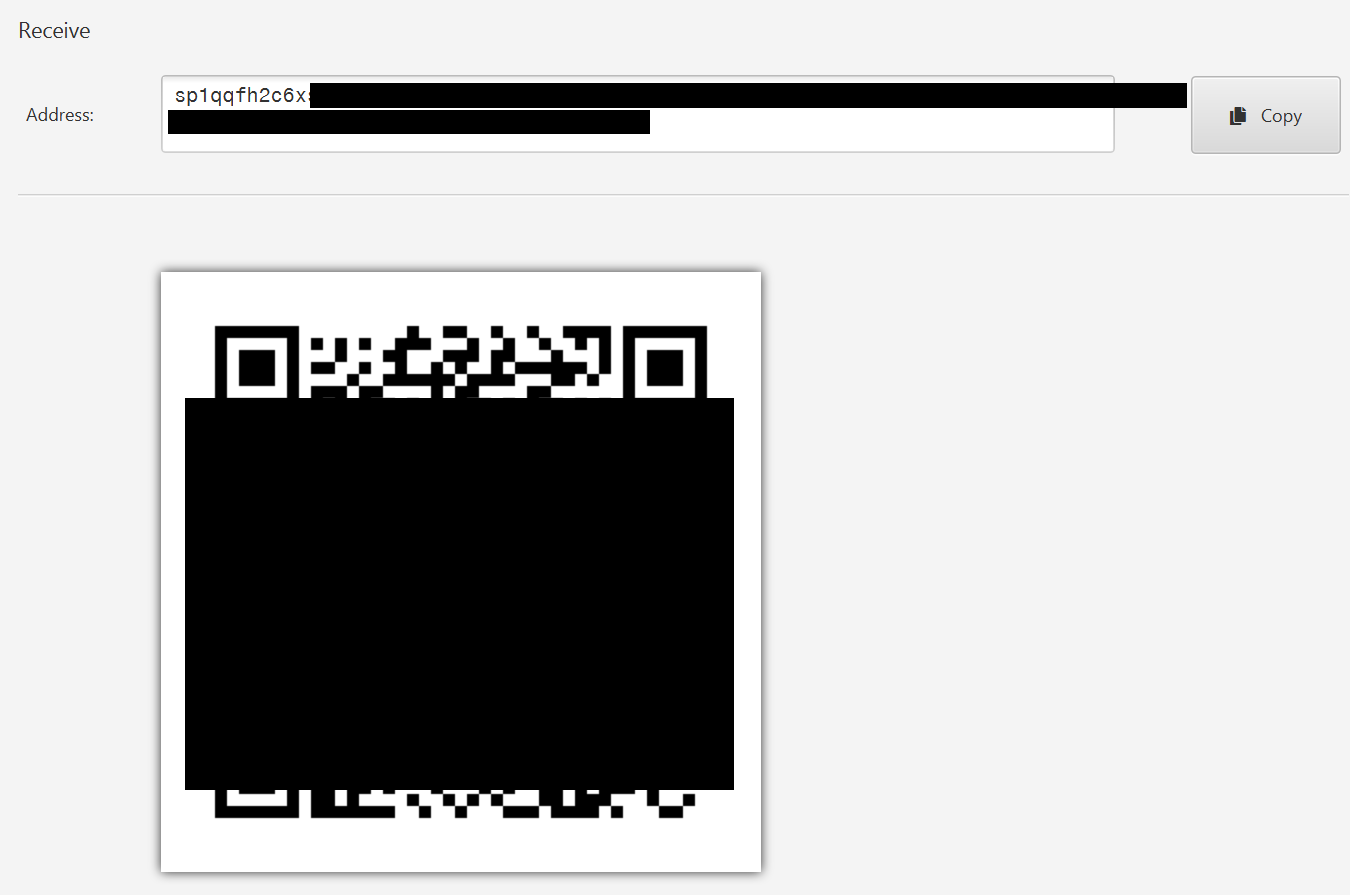
Go to the receive screen and you will see a silent payment address starting with sp1, along with a QR code. It is reusable: as long as the sender's wallet supports silent payments, they can use it to generate a fresh Bitcoin address for you as many times as needed. Of course, you cannot receive payments from users whose wallets don't support silent payments.
Silent payments is one of the protocols I am watching closely to see whether it catches on. If exchanges adopt it for deposits, we can hope for a big improvement in the privacy problems caused by reused deposit addresses.
For more details on silent payments, see the article below.
アドレス再使用を防ぐプライバシー対策Silent PaymentsはBIP47/PayNymをどう改善したのか
ビットコインのアドレス再使用を防ぐ技術として注目されているSilent Paymentsが、従来から存在するBIP47という類似の技術とどう異なるかを解説します。さらにその背景にある設計思想の違いにも触れ、最後に取引所の入金アドレスを最適なユースケースの例として提案します。
加藤 規新
No Lightning Network support
On the other hand, one feature Sparrow Wallet lacks is Lightning support. For now it is strictly an on-chain wallet. So it is fair to think of it less as a wallet for everyday spending and more as a tool for handling large amounts and hardware wallets.
Perfect for learning about Bitcoin technology and privacy
As you can see, Sparrow Wallet not only offers advanced privacy features but also lets you get to know many aspects of Bitcoin technology: the structure of Bitcoin transactions, how wallets are created and used, hardware wallet integration, multisig and more. If you are eager to learn, set up an Electrum server with Umbrel or similar and give it a try.
I hope features like Sparrow Wallet's automatic privacy optimization become available in other wallets too.
💡
One more warning: there are fake sites that closely imitate Sparrow Wallet's official website. The real one is the .com (do not visit the .net!), but double-check against the official GitHub, Twitter account and similar sources before downloading or building it.
https://www.sparrowwallet.com/